An internship resume for freshers should be one page, focused on one target role, and built around what you can prove: your projects, your skills, and your education. You don't need work experience. You need evidence that you can learn and build. This guide shows you the resume format to use, what to write in each section, and a sample internship resume you can adapt, even if you have no experience at all.
Here is something most students don't realise: your resume isn't only used to shortlist you. In the interview, it becomes the question paper. When I interview interns, a large part of the conversation comes from what they wrote on their resume. Every line on it is a question you should be ready to answer.
Key takeaways
- Keep your internship resume to one page, focused on one target role, in a simple single-column layout.
- Projects are your most important section with no experience: name the technologies, link the code, and write specific bullets.
- List only skills you can answer questions about, because every line can be asked in the interview.
- Leave out your photo, date of birth, and other personal details, and use the space for projects.
- Tailor each version to the job description, and bring that same version to the interview.
What Recruiters Look For in a Fresher Resume
A recruiter usually scans a resume quickly before deciding whether to read it properly. In that first look, they check:
- Is the target role clear? A resume that tries to fit every role fits none of them.
- Are the skills relevant to the role they are hiring for?
- Are there real projects, with technologies named and links to the code?
- Is the education section complete and easy to find?
- Is it clean and readable, without spelling mistakes or clutter?
Marks and college name matter less than most students think. I have interviewed toppers who couldn't explain their own code, and average students who solved problems clearly and confidently. Your resume should show the second kind of student.
The Best Resume Format for Freshers
- Length: one page. As a fresher, you rarely have enough relevant content for two.
- Layout: a simple single-column layout. Avoid multiple columns, text boxes, graphics, rating bars, and icons, because many applicant tracking systems (ATS) can't read them reliably.
- Font: a standard font such as Arial or Calibri, around 10–12 pt for body text.
- File: PDF, named clearly, for example Firstname_Lastname_Backend_Intern.pdf.
- Leave out: photo, date of birth, religion, marital status, father's name, and a "Declaration" at the end. Older Indian resume formats often include these, but they add nothing to an IT internship resume and take up space you need for projects.
Recommended section order
| # | Section | What goes in it |
|---|---|---|
| 1 | Header | Name, phone, professional email, city, LinkedIn, and GitHub |
| 2 | Summary | Two or three lines: target role, core skills, what you are looking for |
| 3 | Skills | Grouped by category, only skills you can answer questions on |
| 4 | Projects | Your strongest section as a fresher: two or three projects |
| 5 | Education | Degree, college, years, CGPA |
| 6 | Experience (if any) | Internships, freelance work, open source, or college technical roles |
| 7 | Certifications | Only ones relevant to your target role |
| 8 | Achievements and activities | Hackathons, competitions, technical clubs, leadership roles |
If your academic record is strong, or your college's campus recruiters expect it first, you can move Education above Skills. Either order is acceptable. What matters is that projects and skills aren't buried at the bottom.
Section-by-Section: What to Write
Header
Your name in a slightly larger font, then one line of contact details. Use a professional email address based on your name. Add your LinkedIn and GitHub links, and make sure both are up to date, because recruiters do click them. See LinkedIn Profile Tips for Students and Build a GitHub Portfolio That Gets You Interviews.
Resume summary
Two or three lines that answer one question: what role are you targeting, and what can you already do? Skip vague phrases like "hard-working individual seeking a challenging position".
| Weak | Strong |
|---|---|
| "Motivated and hard-working fresher looking for a challenging role in a reputed organisation to grow my skills." | "Final-year B.Tech (CSE) student preparing for a back-end developer role. Built two REST APIs with Java, Spring Boot, and MySQL. Looking for an internship where I can work on real APIs and learn production practices." |
Skills
Group your skills so they are easy to scan, and include the complete set your target role needs. A developer resume with a front-end framework but no back-end or database skills looks incomplete.
Example
Languages: Java, SQL, JavaScript. Frameworks: Spring Boot, React. Database: MySQL. Tools: Git, GitHub, Postman, VS Code. Concepts: OOP, REST APIs, basic data structures
The golden rule: only list what you can answer questions about. If "Docker" is on your resume, expect to be asked about Docker. For help choosing what to include, read Skills to Put on an IT Internship Resume.
Projects: your most important section
For a fresher, projects do the job that work experience does on an experienced professional's resume. Choose two or three projects that match your target role, ideally ones built end to end. A project based on a real-world problem is stronger than a copy of a tutorial.
Write each project as a title, a one-line description, the technologies used, a GitHub link, and two or three bullets. Use this formula for each bullet:
Formula
Built / implemented [what] using [technology] to [purpose or result].
| Weak bullet | Strong bullet |
|---|---|
| "Made a library management system." | "Built a REST API for library management using Spring Boot and MySQL, supporting book search, issue, and return for 3 user roles." |
| "Worked on login page." | "Implemented JWT-based login and role-based access, restricting admin actions to authorised users." |
| "Did testing of website." | "Wrote 40+ manual test cases for the checkout flow and logged 12 defects with clear reproduction steps in Jira." |
Be ready to explain every project in detail. I once interviewed a candidate who wrote a complete API during the interview but couldn't explain how the code worked or why he had written it that way. For each project on your resume, be ready to explain why you chose it, how you understood the requirements, which technologies you used and why, what problems you hit, and how you solved them. More on this in How to Explain Your College Project in an Interview.
Education
List your degree, branch, college, and years, along with your CGPA or percentage. Including 10th and 12th marks is optional. Add them if they are strong or if a company asks for them; otherwise, the space is better used for projects. Relevant coursework (for example, DBMS, Operating Systems, Computer Networks) can be added in one line if you have room.
Experience, when you have none
No internship yet? That is normal. All of these count as experience if you describe what you actually did:
- Freelance or paid work for a local business, even a small website.
- Open-source contributions, including documentation fixes.
- Hackathons and coding competitions.
- Technical roles in college clubs, festivals, or events.
- Volunteer technical work, for example for an NGO.
If none of these apply yet, leave this section out. A strong Projects section is enough. For more ideas, read How to Get an IT Internship Without Experience.
Certifications
A certification won't get you an internship on its own, but a relevant one shows genuine interest and commitment. A foundation-level certification in your chosen technology is a good start. Don't collect certificates just to fill space. Add only those that match your target role and that you can explain in an interview.
Achievements and activities
Keep this short and specific. "Top 10 of 200 teams in [hackathon name]" is better than "participated in many events". Leadership roles, such as organising a college technical event, show communication and responsibility, which interviewers value.
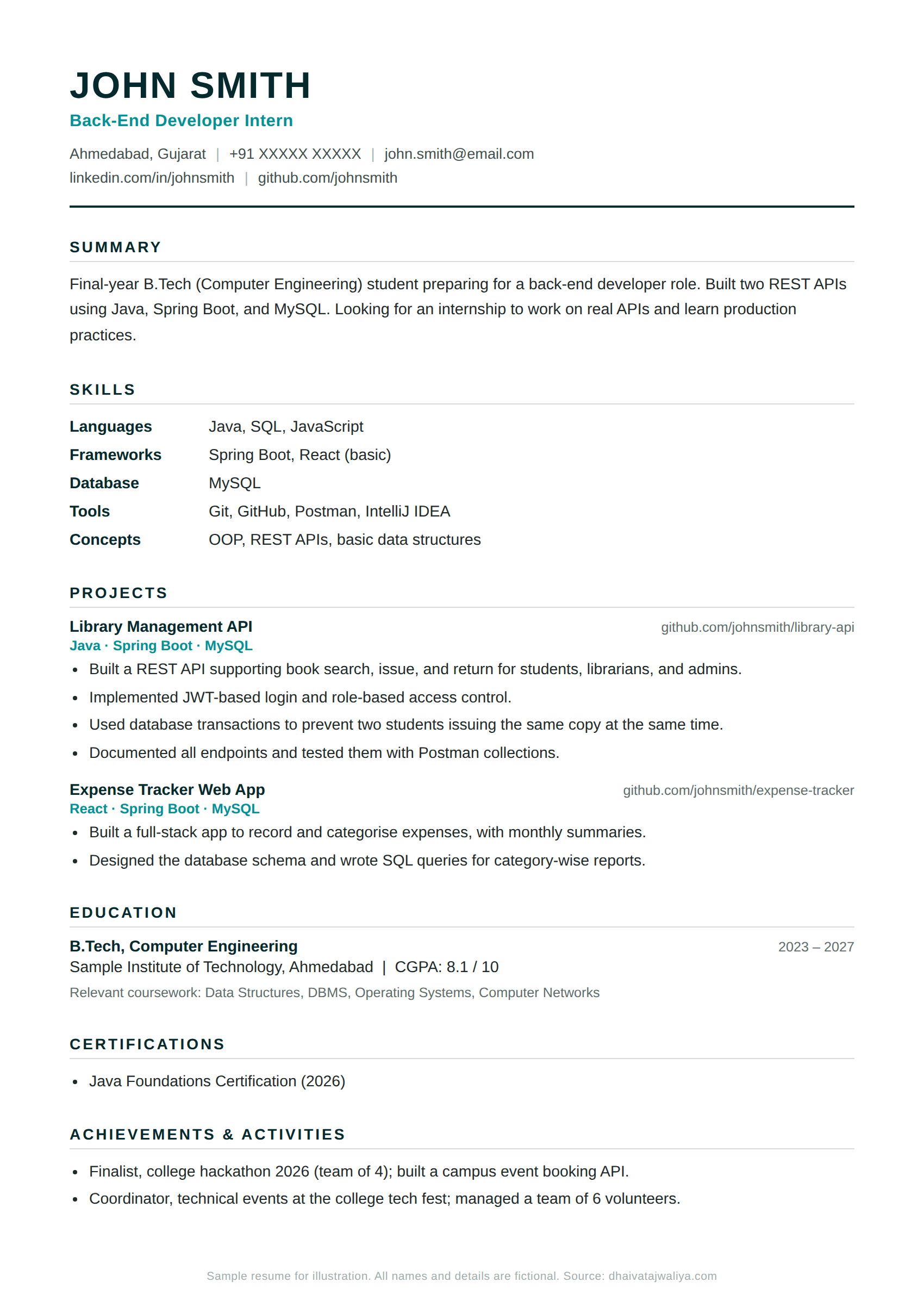
Sample Internship Resume (Fresher, Back-End Developer)
This is a fictional example to show structure and wording. Adapt it to your own role, projects, and details.
Tailoring Your Resume for ATS and Each Application
Many companies use an applicant tracking system (ATS) to collect and filter applications. To keep your resume readable by these systems, and by people:
- Use a simple single-column layout and standard section headings ("Skills", "Projects", "Education").
- Use the same terms the job description uses wherever they are genuinely true for you. If the listing says "REST APIs", write "REST APIs", not only "web services".
- Don't add keywords you can't back up. Getting past the ATS only helps if you can then pass the interview.
- Move the most relevant projects and skills to the top for each role.
Keep track of your versions. Save each tailored resume with the company name, and bring that same version to the interview. I have seen interns bring a different resume to the interview than the one they applied with, listing different technologies and projects. It immediately raises doubts. For the full application process, read How to Apply for an IT Internship.
Common Resume Mistakes Freshers Make
- Listing every technology you have ever touched, instead of the ones you can explain.
- Writing projects as one vague line, with no technologies and no link.
- Using a fancy template with columns, graphics, and skill rating bars.
- Going over one page with personal details, hobbies, and a declaration.
- Spelling and grammar mistakes, especially in technology names ("Javascript", "Mysql", "Github").
- Broken or empty GitHub and LinkedIn links.
- Copying a friend's or a template's project descriptions.
- Sending the same resume for a testing role and a development role.
Final Resume Checklist
- It fits on one page, in a clean single-column layout.
- My target role is clear from the summary.
- Every skill listed is one I can answer questions about.
- Each project has technologies, a GitHub link, and specific bullets.
- I can explain every project completely: why, how, challenges, and solutions.
- My LinkedIn and GitHub links work and are up to date.
- I have read my resume at least three times and checked for errors.
- It is saved as a PDF with a clear file name, and I know which version I sent to which company.
Want to see how your overall preparation looks? Take the free IT Internship Readiness Test.
Frequently Asked Questions
How do I make a resume for an internship with no experience?
Build it around projects, skills, and education. Choose one target role, list the skills that role needs, and describe two or three projects with the technologies used, a GitHub link, and specific bullets. Add hackathons, open-source work, or college technical roles if you have them.
Should a fresher resume be one page?
Yes. A one-page resume is the standard for freshers and interns. It forces you to keep only the most relevant information, and recruiters can scan it quickly.
Should I include my 10th and 12th marks?
It is optional. Include them if they are strong or if a company specifically asks for them. Otherwise, use the space for projects and skills.
Should I add a photo to my internship resume?
No. A photo isn't needed for IT internship applications and takes up space. The same applies to date of birth, religion, marital status, and a declaration.
Should I write a resume summary or a career objective?
A short resume summary works better. It tells the recruiter your target role and what you can already do, while a generic career objective usually says only what you want.
How many projects should I put on my resume?
Two or three projects relevant to your target role are enough. One project you can explain completely is worth more than five you can't.
Can I use a resume template or online resume builder?
Yes, as long as the result is a simple single-column layout. Avoid designs with multiple columns, graphics, icons, or skill bars, because they can confuse applicant tracking systems and distract recruiters.
Your next step
Decide exactly which skills belong on your resume with Skills to Put on an IT Internship Resume, then make your projects easy to verify with Build a GitHub Portfolio That Gets You Interviews.
Skills to Put on an IT Internship ResumeMore Free Resources for IT Students
- Free test: IT Internship Readiness Test. Check your technical foundation, projects, communication, and interview readiness in about five minutes.
- Free assessment: Which IT Role Suits You Best? Explore which of ten IT roles match your interests, strengths, and working style.
- Free reference: IT Internship Glossary. The terms you will hear before and during your internship, explained simply.
- Book: The Lost Intern: The Complete IT Internship Guide. Practical answers on choosing a role and company, and preparing for your first internship.
- Free mentoring: feeling stuck as a fresher? Apply to the Fresh Start cohort.

About the author
Dhaivat has 16+ years of experience in the IT industry, working on AI and cloud technologies, project delivery, and engineering leadership. He has interviewed and mentored many interns, wrote The Lost Intern, and runs the non-commercial Career Impact Initiative, mentoring students for free.